

Screen Time in Schools: What the Evidence Says

This fall, if you lead math or intervention in a district, you are probably being asked for two things at once. Parents, board members and, in some states, lawmakers are concerned about screen time at school, and yet you still need to keep intervention going for the students furthest behind. In many districts, some of that intervention now happens on a device.
You can already see the pressure in district and state policy. As of October 2026, New York City has taken individual devices out of pre-K to grade 2 and Los Angeles Unified has no screens before second grade. Iowa caps digital instruction at 60 minutes a day in grades K to 5.
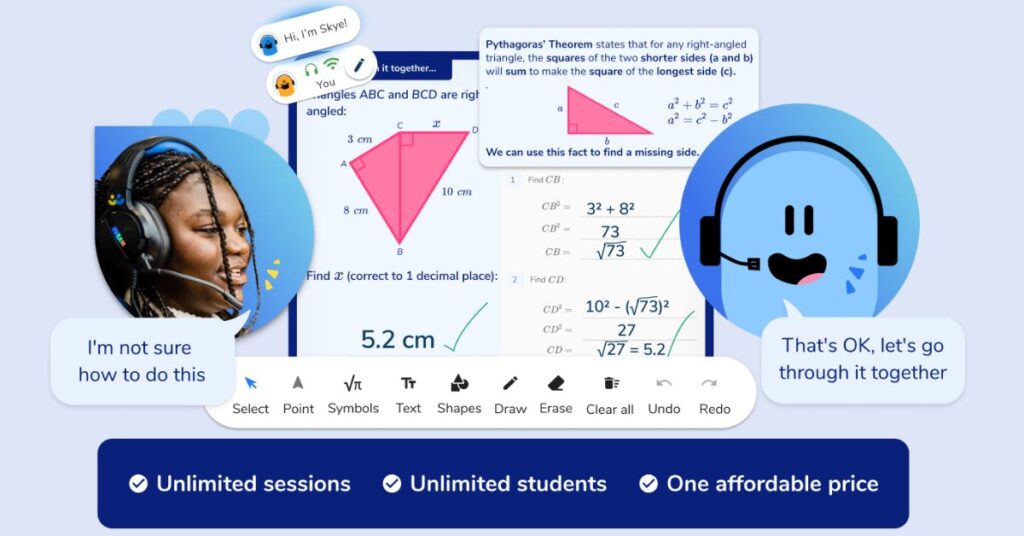
Third Space Learning is an edtech company, and students being taught by our AI math tutor, Skye, have their lessons on a screen.
We’ve worked with 4,200 schools since 2013, and in that time we’ve had to think hard about when time on a screen is worth it for a child and when it isn’t. This guide sets out what researchers have found about screen time and student achievement, and how screen use for learning differs from screen use for leisure. It then gives you two questions to ask of any screen activity or tool, and finishes with a letter principals can adapt and send home.
Book a free AI math tutoring pilot for up to 20 of your students.
See how unlimited one-on-one high-dosage math tutoring can support your school or district and boost students’ math achievement.
Developed by math teachers, trusted by 4,100+ schools, and counting.
Book a free pilotKey takeaways
- There is no official US screen time limit for school-age children. The AAP has not set a fixed daily limit for them since 2016, and the “two hours a day” you’ll often hear goes back to its 2001 guidance on television, though HHS suggested the same figure in a May 2026 advisory.
- As of October 2026, districts and states are setting limits anyway: Iowa caps digital instruction at 60 minutes a day in grades K to 5, and NYC and LAUSD have both restricted devices for their youngest students.
- In the Education Week Research Center’s spring 2026 survey of 753 educators, 55% said students spend three hours or more a day on ed tech. In high school it was 76%.
- In the OECD’s PISA 2022 study, 15-year-olds across OECD countries who used devices for learning at school for up to an hour a day had higher math scores, while those who spent more than an hour a day on devices for leisure at school had lower ones.
- In a 2024 review of tutoring experiments by Nickow, Oreopoulos and Quan, tutoring had the biggest effects when sessions ran at least three days a week and when they took place during the school day. Every study in that review used human tutors.

Effective Math Interventions: A Guide for Schools and Districts
Everything you need to know about how to implement effective tiered interventions, covering Tier 1, Tier 2, and Tier 3 for math. Detailed recommendations and examples of best practice in math interventions for each tier
Download Free Now!Why screen time in schools is in the news
There is a growing backlash against screens in the classroom (AP, May 2026), and as of October 2026, districts and states worried about too much screen time have started to write limits into their rules on technology use.
NYC, LAUSD and other districts
On September 2, 2026, New York City Public Schools took individual devices out of pre-K to grade 2 and recommended a maximum of 30 minutes a day in grades 3 to 5 and 45 minutes in middle school (Chalkbeat, September 2026). NYC also paused student-facing generative AI, including chatbots and AI tutors, up to grade 8 for the 2026-27 school year.
Under Los Angeles Unified’s policy, approved on June 23, 2026, classrooms are screen-free before second grade, with daily or weekly caps for every grade after that, homework included (K-12 Dive, June 2026).
States and federal advice
Iowa’s HF 2676, in force from July 1, 2026, says that in grades K to 5 “digital instruction shall not exceed sixty minutes per school day”. IEP and 504 plans, state assessments, screening, progress monitoring and computer science don’t count toward the hour, and parents can ask for less (Iowa Legislature, 2026).
Tennessee’s Public Chapter 808, also in force from July 1, 2026, says K to 5 policies must “Prioritize in-person, teacher-led instruction”, and that it “does not prohibit” digital tools for “Targeted instructional support, intervention, or remediation”.
NBC News counted 16 states with bills to limit educational technology in 2026 (NBC News, March 2026), and you can see where things stand in the table below.
On May 20, 2026, HHS issued a “Surgeon General’s warning” on screen use, which is an advisory, not law. It has recommendations for families, schools and policymakers, and HHS singles out social media and some types of recreational screen time.
On September 3, 2026, the American Psychological Association published a report arguing against outright screen bans and arbitrary time limits, and asked for independent evaluations of edtech (Chalkbeat, September 2026).
| Who | What | Grades | Date | Status (as of October 2026) |
|---|---|---|---|---|
| New York City Public Schools | No individual devices; recommended maximum of 30 minutes a day (grades 3 to 5) and 45 minutes (middle school); student-facing generative AI paused | Pre-K to 2 (laptops and tablets); 3 to 8 (minutes); up to 8 (AI) | September 2, 2026 | District policy; minutes are recommendations |
| Los Angeles Unified | No screens before grade 2; daily or weekly caps after that, homework included; student use of generative AI paused | Early education to 12 | June 23, 2026 | District policy, 2026-27 |
| Canon-McMillan, Pennsylvania | No regular laptops or tablets; shared carts | K to 2; 3 to 8 | Reported August 2026 | District policy |
| Iowa, HF 2676 | Digital instruction capped at 60 minutes a day | K to 5 | Signed May 20, 2026 | In force from July 1, 2026 |
| Tennessee, Public Chapter 808 | Teacher-led, non-electronic instruction first; technology only with a clear educational benefit | K to 5 | July 1, 2026 | In force |
| Utah, HB 273 | Model policy limiting screen time | K to 3 | Due December 1, 2026 | Signed |
| Alabama, HB 78 | Screen time limits | Early childhood to K | January 1, 2027 | Signed, not yet in force |
| HHS | Surgeon General’s warning on screen use | Children and teens (0 to 18) | May 20, 2026 | Advisory, not law |
Is this about phones, screens or AI?
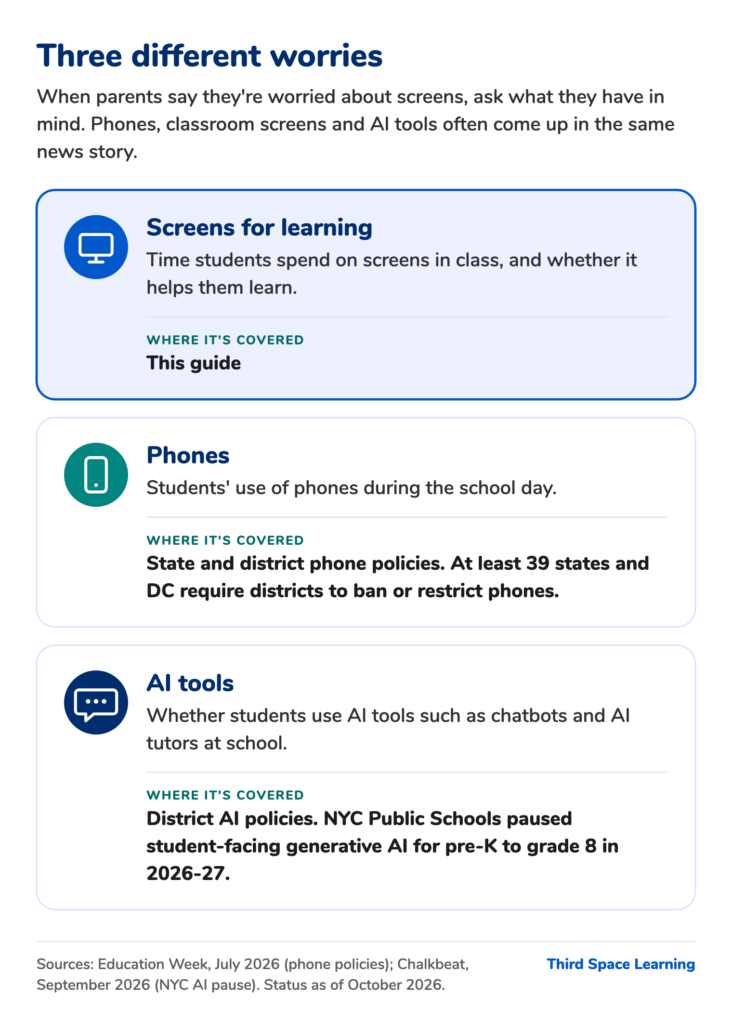
When parents say they’re worried about screens, it helps to ask what they have in mind, because phones, classroom screens and AI tools often come up in the same news story.
In the HHS warning, the harms to young people’s health and well-being come from “harmful screen use”, which HHS defines as use that is “excessive, difficult to control” or exposes children to harmful content, “particularly on social media” (HHS, 2026). Phones are a separate question: “at least 39 states and the District of Columbia” now require districts to ban or restrict them (Education Week, July 2026).
As of October 2026, no state has banned AI in classrooms, but NYC and LAUSD have paused student use of generative AI for 2026-27, and Oklahoma requires AI tools to be “educator-directed” with a “human-in-the-loop”. Our guide to AI policy for schools and our post on AI in education cover this in more detail. For the rest of this guide, we focus on screens used for learning in the classroom.
Does screen time affect academic performance? What the evidence says
According to the OECD’s PISA 2022 study, students who used screens a little for learning at school had higher math scores, and students who spent more than an hour a day on them for leisure at school had lower ones (OECD, PISA 2022).
There is no official US screen time limit for school-age children
If someone asks you what the official limit is, you can tell them there isn’t one for school-age children. The American Academy of Pediatrics (AAP) has not set a fixed daily limit for children aged 5 to 18 since 2016, when it said the evidence on healthy media use “does not support a one-size-fits-all approach” (AAP, 2016). In its January 2026 policy statement, the AAP said that “‘media and children’ cannot be viewed solely through the lens of individual child behaviors or screen limits alone” (AAP, 2026).
In the federal Healthy People 2030 goals, the only number is for children aged 2 to 5: no more than one hour of screen time a day. For ages 6 to 17, the goal is to follow the AAP’s recommendations (HHS, Healthy People 2030).
You’ll still hear “two hours a day” a lot. The AAP recommended “no more than 1 to 2 hours of quality programming per day” in its 2001 statement on television (AAP, 2001), and on May 20, 2026, HHS suggested in an advisory that families could limit children aged 6 to 18 to two hours a day (HHS, Surgeon General’s warning on screen use, 2026). The warning is an advisory, so schools don’t have to follow it.
Leisure and learning are not the same
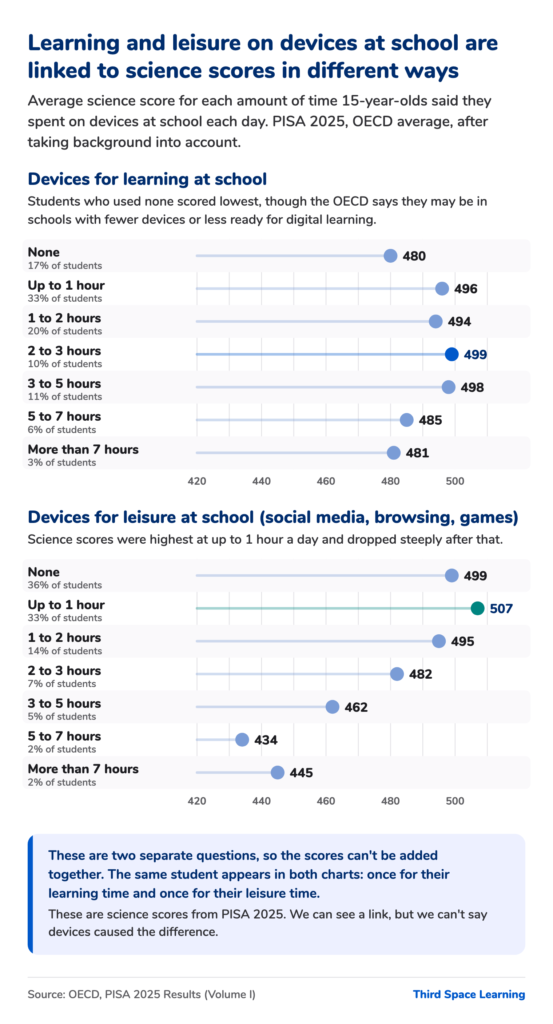
The best large-scale evidence is from PISA, the OECD’s international test of reading, math and science for 15-year-olds, so it is most relevant to high schools. Across OECD countries in PISA 2022, students who used devices for learning at school for up to an hour a day scored 14 points higher in math than students who used none, once the OECD had taken their background into account (OECD, PISA 2022). Students who spent up to an hour a day on devices for leisure at school also scored slightly higher, and those who spent more than an hour a day scored lower.
In its PISA 2025 report, the OECD said: “While limited or moderate use of digital devices for learning at school is often associated with better outcomes, when they are used for leisure at school, the relationship reverses sharply” (OECD, PISA 2025).
For US students, the latest figure we have is from PISA 2022: 30% said they got distracted using digital devices in most or all math lessons, the same as the OECD average (OECD, PISA 2022 US country note). There’s no 2025 figure, because over 40% of US students weren’t given the student questionnaire. We’ve written more about that in our post on the US PISA results.
Both studies are correlational, so we can say there is a link, but we can’t say the technology caused the difference in scores.
How much screen time do students get at school?
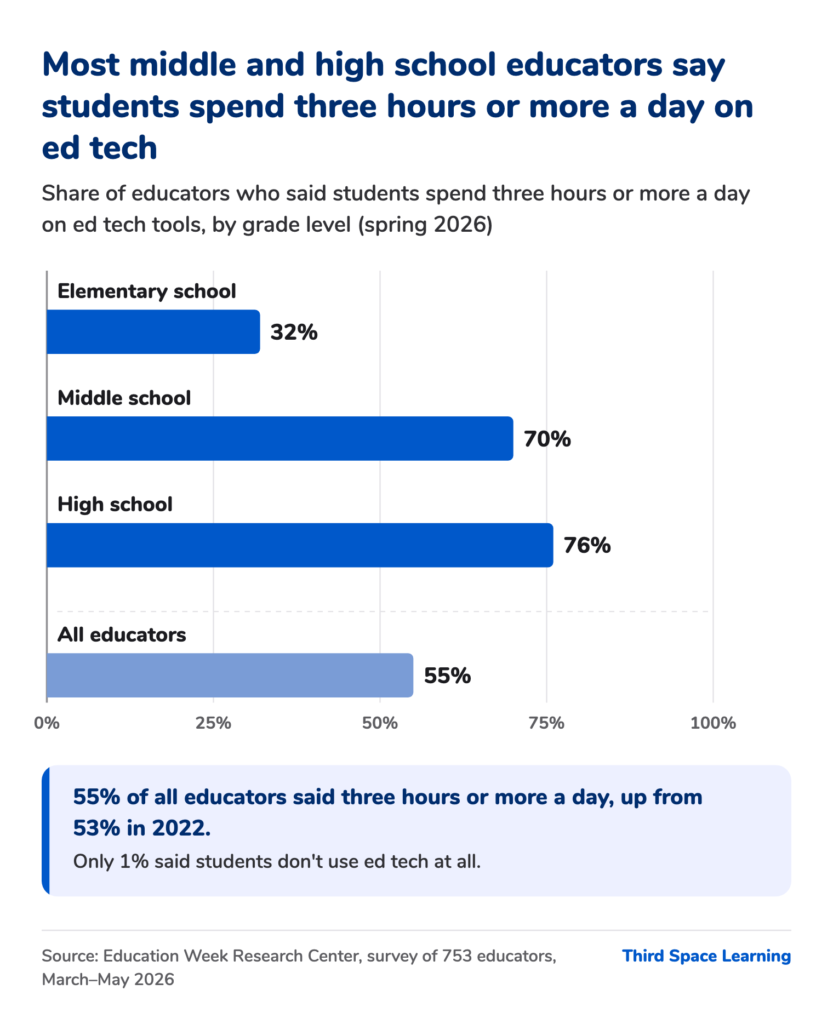
The Education Week Research Center asked 753 educators in spring 2026 how much time students spend on ed tech tools. 55% said three hours or more a day, up from 53% in 2022 (Education Week Research Center, July 2026).
The answers varied a lot by grade level and subject:
- Elementary school: 32% said three hours or more a day.
- Middle school: 70% said three hours or more, and 20% said students are on ed tech all day.
- High school: 76% said three hours or more.
- Math and computer science teachers: 57% said three hours or more.
Only 1% of educators said students don’t use ed tech at all, and 16% said less than an hour a day.
In a Walton Family Foundation and Gallup survey of 2,101 teachers, “more than six-in-ten teachers say students should spend less time on screens during the school day”, but they are “not calling for mandatory daily screen-time limits” (Walton Family Foundation and Gallup, September 2026).
Reading on screen, and tools students don’t use
In two meta-analyses of the research, readers understood informational texts slightly better on paper than on screen, especially when they were short of time (Delgado and colleagues, 2018; Clinton, 2019).
Students don’t always use the digital tools a district buys, either: in a Khan Academy study of 99 districts, only 4.7% of students used it as recommended (Education Next, 2024), and in a 2026 Stanford study, nearly half the students given access to an AI literacy platform on their own never used it (Stanford NSSA, 2026).
Two questions to ask of any screen time in school
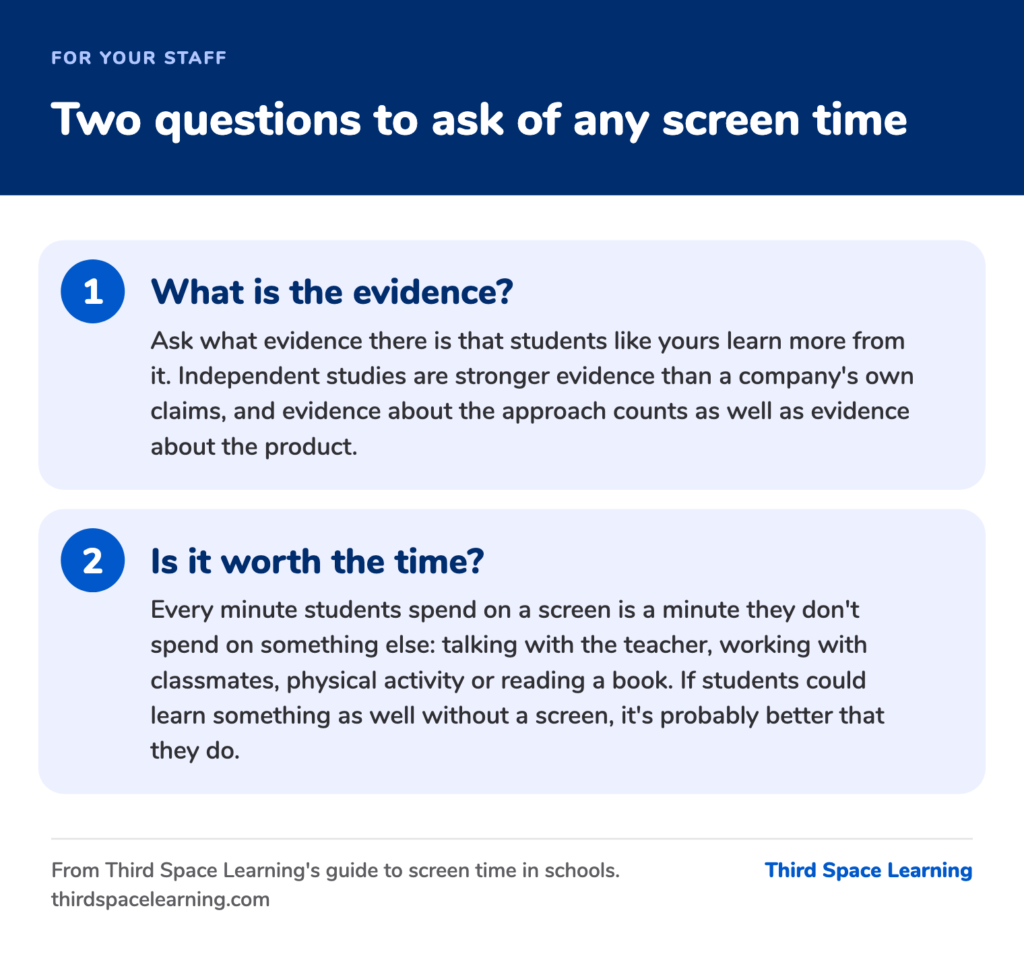
What is the evidence?
Before you put any screen-based activity on the schedule, ask what evidence there is that students like yours learn more from it. If you work in Iowa, you may already be asking it: the Iowa Department of Education’s sample board policy for the new state law says to use instructional technology “only when it possesses an evidence-base” (Iowa Department of Education, 2026). The Every Student Succeeds Act (ESSA) has four tiers of evidence. For the top three, the intervention has to have a statistically significant effect on student outcomes:
- For Tier 1 (strong evidence), you need at least one well-designed and well-implemented experimental study.
- For Tier 2 (moderate evidence), a well-designed and well-implemented quasi-experimental study is enough.
- For Tier 3 (promising evidence), you need at least one well-designed and well-implemented correlational study with statistical controls for selection bias.
- For Tier 4 (demonstrates a rationale), you need a rationale based on high-quality research or a positive evaluation that the intervention is likely to improve student outcomes, with ongoing efforts to examine its effects.
Schools that use federal Title I school improvement funds (ESSA section 1003) have to choose interventions with evidence from one of the top three tiers (Every Student Succeeds Act, 2015).
Independent studies are stronger evidence than a company’s own claims, and evidence about the approach (such as tutoring or retrieval practice) counts as well as evidence about the product.
Is it worth the time?
Every minute students spend on a screen is a minute they don’t spend on something else: talking with the teacher, working with classmates, physical activity or reading a book. If students could learn something as well without a screen, it’s probably better that they do.
Use the questions for a tool audit
The same two questions work for every tool and digital resource your district pays for. Now that federal pandemic relief money (ESSER) has run out, districts are paying out of their own budgets for the tools they bought with it, so you can ask of each one what the evidence is and what students give up to use it. That way, if your state or board sets a cap on minutes, you already know which tools you would keep.
A checklist for screen-based activities
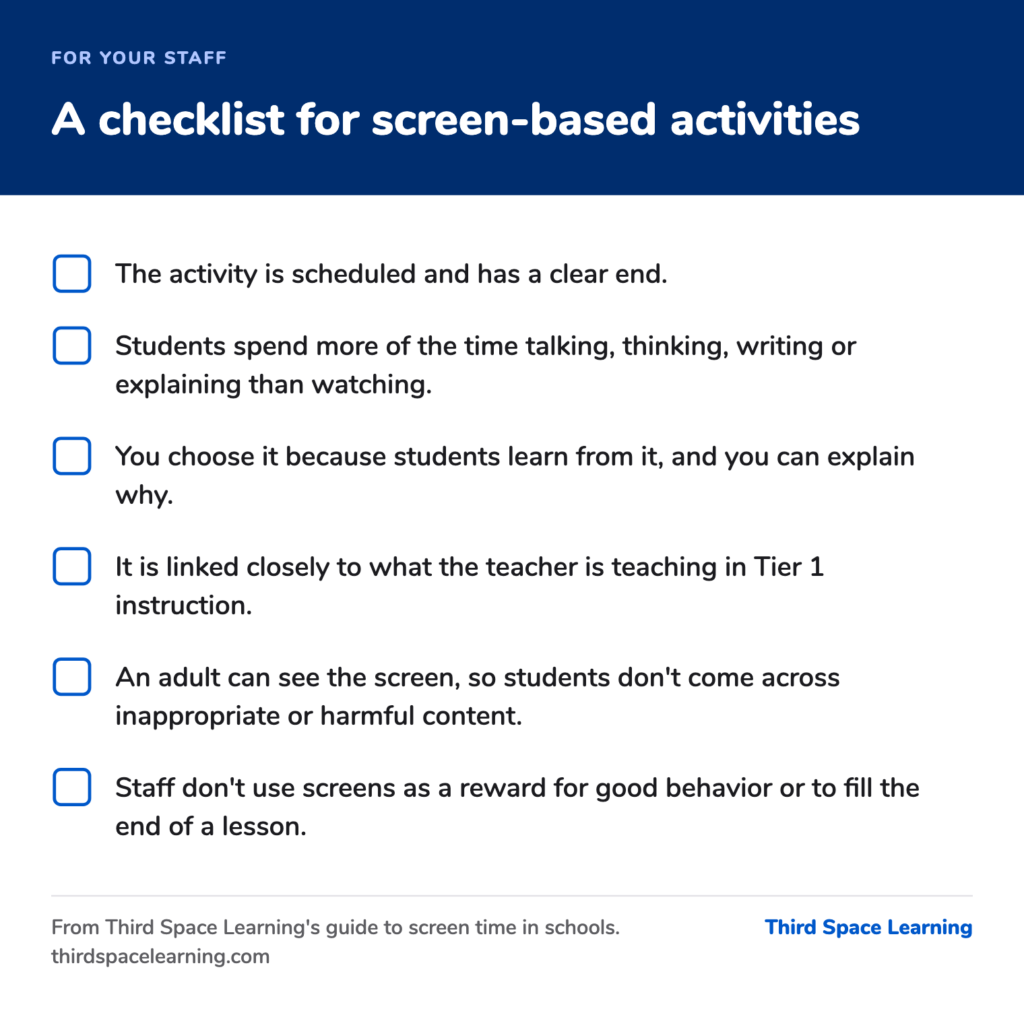
You can use these points to agree how staff use digital tools at any grade level:
- The activity is scheduled and has a clear end.
- Students spend more of the time talking, thinking, writing or explaining than watching.
- You choose it because students learn from it, and you can explain why.
- It is linked closely to what the teacher is teaching in Tier 1 instruction.
- An adult can see the screen, so students don’t come across inappropriate or harmful content.
- Staff don’t use screens as a reward for good behavior or to fill the end of a lesson.
Screen time for elementary, middle and high school students
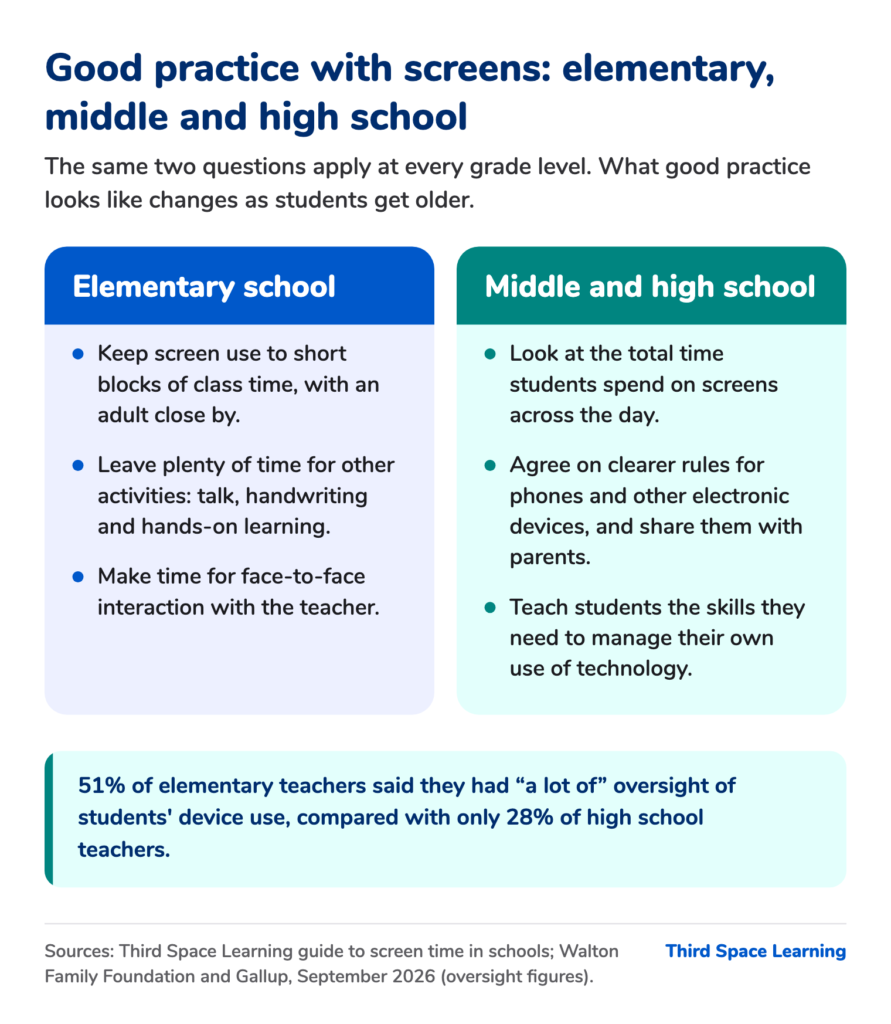
Elementary school
For younger students, you can keep screen use to short blocks of class time with an adult close by, and leave plenty of time for other activities: talk, handwriting, hands-on learning and face-to-face interaction with the teacher.
Middle and high school
For older students, look at the total time students spend on screens across the day. Devices can also get in the way of student engagement in lessons: half of high school teachers in the Gallup survey said devices are a major or moderate distraction, compared with 18% of elementary teachers. In the same survey, 51% of elementary teachers said they had “a lot of” oversight of students’ device use, but only 28% of high school teachers did.
As students get older, you may want to agree on clearer rules for phones and other electronic devices and share them with parents. You can also help students develop the skills and digital literacy they need to manage their own use of technology. Our post on the US PISA results has more on how 15-year-olds use devices.
So you are under real pressure to cut screen minutes, and you still need to keep intervention going. You have to decide which screen time is worth keeping, and that’s where online or AI tutoring comes in – tutoring is a research-backed intervention, with dozens of randomized experiments showing consistently strong results (Nickow, Oreopoulos and Quan, 2024).
What is high-impact tutoring?
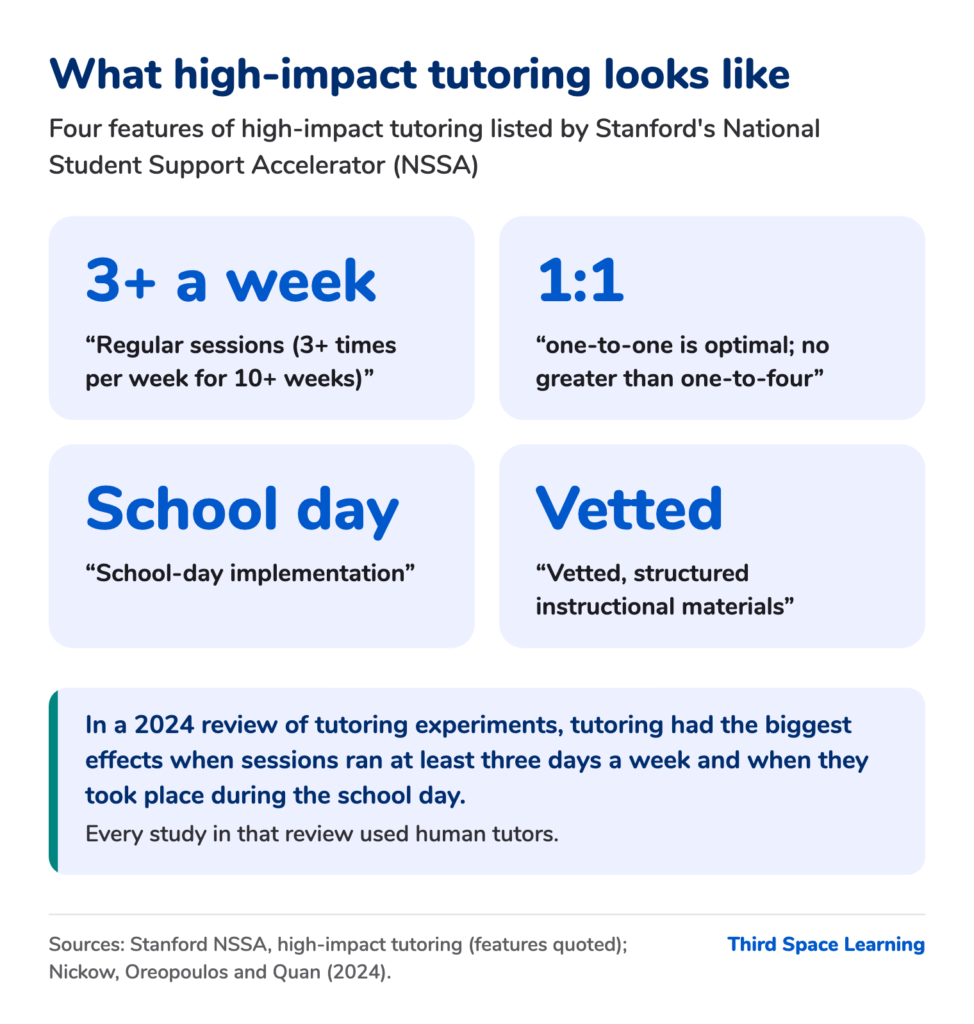
What makes tutoring high-impact
Stanford’s National Student Support Accelerator (NSSA) lists the features of high-impact tutoring (sometimes called high-dosage tutoring), including “Regular sessions (3+ times per week for 10+ weeks)”, where “one-to-one is optimal; no greater than one-to-four”, with “School-day implementation” and “Vetted, structured instructional materials” (Stanford NSSA).
What researchers found
Nickow, Oreopoulos and Quan found a pooled effect of 0.29 standard deviations, and the effect was largest when teachers or paraprofessionals did the tutoring, for students in earlier grades, and when sessions ran three or more days a week and took place during school (Nickow, Oreopoulos and Quan, 2024).
In Chicago’s Saga trials, grade 9 and 10 students had daily small-group tutoring, two students to a tutor, and gained 0.16 and 0.37 standard deviations (NBER working paper 28531). All of these studies used human tutors, so we can say tutoring works as an approach, but we can’t say that any one product does.
Where tutoring fits with screen time limits
Tutoring is often used as a Tier 2 intervention within MTSS, linked to what students learn in class (see our guide to Tier 2 interventions).
Under Tennessee’s law, schools can still use technology for intervention. In Iowa, outside an IEP or 504 plan, online tutoring counts toward the 60 minutes, so an elementary school has to fit it inside that hour of class time.
What we know about AI and tutoring
We’re at an early stage with the research on AI and tutoring. In Stanford’s Tutor CoPilot trial, researchers used AI to support 900 human tutors (Tutor CoPilot, 2024). In an exploratory trial with 165 students in five UK secondary schools, Eedi and Google DeepMind found that students tutored by an AI model, with expert tutors checking its messages, did at least as well as students tutored by humans alone. We haven’t found a US K-12 randomized trial of a fully AI math tutor yet but our current research project work with the Gates Foundation we hope will contribute to the field here (see below).
Federal funding for tutoring
The US Department of Education lists “AI-Enhanced High-Impact Tutoring” as an allowable use of federal grant funds (Dear Colleague letter, July 22, 2025), and it names “high-impact tutoring” in its April 13, 2026 grant priority.
Applying the two questions to our own product
What is the evidence for AI tutor Skye?
We’re building the evidence for Skye, starting with what schools see in their own data. Ryan Lucas, Principal at Governor’s Ranch Elementary in Colorado, told us: “Our MAP data shows that 100% of low-growth students made measurable progress by the end of the year.” That is one school’s own data, not a study.
Madeline Loeb, Director of Curriculum and Instruction at Primary Hall Charter School in New York, said: “There are certainly students who feel far more confident speaking with Skye than they do in a classroom setting.”
The research we’re part of
In February 2026, Third Space Learning announced a two-year research partnership with Stanford University and Cornell University, funded by the Gates Foundation. The researchers are asking whether AI tutoring can achieve the same outcomes as human high-dosage tutoring, and whether students stay motivated over time and can access AI tutoring equitably. Third Space Learning is also listed as a verified tutoring provider by Stanford’s NSSA.
Is AI tutoring with Skye worth the time?
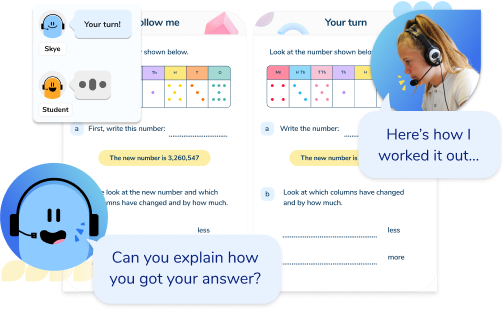
Our AI math tutor delivers spoken one-on-one lessons that math teachers write and approve. Students explain their reasoning out loud, and there is nothing on the screen except the lesson slides, so they can focus on the math. Skye checks each answer against the math the student is working on, whatever their accent or phrasing.
The school chooses which students take part and which topics they cover, and decides how much class time to set aside for sessions, so they fit around other activities. Sessions can be any length and run as often as the school needs, and Skye covers math for grades 3 to 8. Teachers can observe sessions.
Student data and district decisions
Student data is encrypted and never used to train third-party AI models, and you can read how we meet FERPA and COPPA on our trust and compliance page. Where a district has paused student use of AI tools, that is the district’s decision to make.
What to tell families about screen time at school
You can adapt this letter for parents in your newsletter or on your website. Change anything in square brackets to match your district’s policy.
You may have seen news stories about screen time in schools. We know families take different approaches to screens, and many of you would like your children to spend less time on them. Here is how we use them at [school name].
- Most of the time, your child learns face to face with their teacher and classmates, without a screen.
- When we use one in class, it is for a set length of time, and the teacher has planned what students will learn from it.
- [In line with our district’s policy, students in grades K to 2 don’t have their own device.]
- We don’t use screens as a reward or to fill time.
[Iowa: Parents can ask for their child to have less digital instruction.] [Oklahoma: Parents can opt their child out of AI tools.] If you have any questions, please speak to your child’s teacher.
Keeping screen time for learning purposeful
Not all screen time is the same, so when parents or board members ask about screens, you can tell them that when students use screens for learning, you keep that time short and purposeful, and say what each minute is for and what students learn from it.
If you’d like to see how a short, spoken one-on-one math session works, you can find out more about our AI math tutor.
Frequently asked questions
As of October 2026, the American Academy of Pediatrics does not set a fixed daily screen time limit for school-age children. In its January 2026 policy statement, the AAP said that “‘media and children’ cannot be viewed solely through the lens of individual child behaviors or screen limits alone”, and it has not set a number for children aged 5 to 18 since 2016. The “two hours a day” figure goes back to its 2001 guidance on television, though HHS suggested the same figure for children aged 6 to 18 in a May 2026 advisory.
Across OECD countries, 15-year-olds who use digital tools a little for learning at school tend to have higher math scores, and those who spend more than an hour a day on devices for leisure at school tend to have lower ones (OECD, PISA 2022). The studies are correlational, so we can say there is a link, but we can’t say the technology caused the difference.
As of October 2026, Iowa caps digital instruction at 60 minutes a day in grades K to 5, and Tennessee requires K to 5 policies to put teacher-led instruction ahead of the use of technology. Utah is writing a model policy for K to 3, due by December 1, 2026. Alabama’s law on screen time in early childhood programs and kindergarten takes effect on January 1, 2027, and requires the state to set guidelines on screen use.
As of July 2026, “at least 39 states and the District of Columbia” require school districts to ban or restrict students’ use of phones (Education Week, July 2026). Rules on phones and other technology use vary from state to state, so check your own state’s policy.
Eighth and tenth graders spent an average of 3.5 hours a day on social media in 2021 (Surgeon General’s advisory on social media and youth mental health, 2023). At school, 55% of educators in the Education Week Research Center’s 2026 survey said students spend three hours or more a day on ed tech, rising to 76% in high school.
The 3-6-9-12 rule is French guidance, not US guidance. The French psychiatrist Serge Tisseron came up with it in 2008 as a set of age milestones rather than daily limits: no screens before 3, no personal games console before 6, no internet before 9 (and then only with an adult) and no unsupervised internet before 12.
Key sources
- Chalkbeat: What to know about NYC public schools’ generative AI ban and screen time limits (September 2, 2026)
- Iowa Legislature: HF 2676 (2026)
- Education Week: Which states ban or restrict cellphones in schools (updated July 28, 2026)
- HHS: Surgeon General’s warning on the harms of screen use (May 20, 2026)
- OECD: PISA 2025 Results (Volume I) (September 2026)
- OECD: PISA 2022 Results (Volume II), chapter 5
- Education Week: How much time are students spending on tech in classrooms? (July 24, 2026)
- Walton Family Foundation and Gallup: Screen Wise (September 16, 2026)
- Stanford NSSA: High-impact tutoring
- Nickow, Oreopoulos and Quan: The Promise of Tutoring for PreK–12 Learning (2024)
Do you have students who need extra support in math?
Skye – our AI math tutor built by experienced teachers – provides students with personalized one-on-one, spoken instruction that helps them master concepts, close skill gaps, and gain confidence.
Since 2013, we’ve delivered 2,295,000 math tutoring sessions to 196,000 students, guiding them toward higher math achievement.
Discover how our AI math tutoring can boost student success, or see how our math programs can support your school’s goals:
– 3rd grade tutoring
– 4th grade tutoring
– 5th grade tutoring
– 6th grade tutoring
– 7th grade tutoring
– 8th grade tutoring