

Cognitive Offloading And AI In Schools: What It Is, Why It Matters, And How To Choose The Right Tools

Cognitive offloading is the use of external tools, such as notebooks, calculators or AI, to reduce the mental effort a task demands. Risko and Gilbert (2016) define it as “the use of physical action to alter the information processing requirements of a task so as to reduce cognitive demand.” With AI now used across many US classrooms, school leaders are asking a sharper question: when does helpful offloading tip into outsourcing the thinking students need to do?
Cognitive offloading is not new. Students have always used tools to reduce the mental effort required to complete a task: notebooks externalize memory, calculators reduce the need for mental arithmetic, and reference books and the internet make valuable information easier to retrieve. Offloading items to an external store, rather than holding them in internal memory, is something people do in everyday life without a second thought. In many cases, that is exactly what good learning tools are supposed to do.
The challenge with AI is different. An AI system can now perform not just part of a task, but much of the thinking that the task was designed to develop.
With students having ready access to artificial intelligence in classrooms and other learning environments, and schools seeking to integrate digital technologies into everyday learning, the risk of AI affecting students’ cognitive performance is no longer theoretical; it is very real. The long-term version of this risk is increasingly described in current research as cognitive atrophy – the gradual decline of skills such as critical thinking, memory and creativity when learners consistently outsource their thinking to AI systems. Put plainly, the worry is that the cognitive capabilities students are in school to build never fully form.
In a 2025 independent randomized controlled trial involving 120 undergraduate students, Barcaui found students using AI chatbots to assist their learning scored 57.5% on a surprise knowledge-retention test 45 days later, compared with 68.5% among students who didn’t use AI. The results showed a gap of 11 percentage points. One possible explanation is that AI reduced some of the effort involved in learning, but that reduced effort may also have weakened the processes that support durable memory.
This article outlines the difference between cognitive offloading and cognitive outsourcing, what the research says about AI technology, what regulators are beginning to expect from schools, and how to evaluate artificial intelligence tools so they scaffold thinking and learning rather than replace it.

The Ultimate Guide to Metacognition
Everything you need to know to successfully embed metacognition across your school or district, Including how metacognitive strategies can help raise math attainment, a step by step guide to teaching metacognition and 10 practical strategies for the classroom.
Download Free Now!Key takeaways
- Three expectations separate a tool that protects thinking from one that erodes it: it should not provide answers by default, it should require student input first, and it should track when students offload thinking.
- In an independent RCT, students using AI tools scored 57.5% on a retention test compared to 68.5% for those who did not (Barcaui, 2025).
- Cognitive offloading is healthy scaffolding. Cognitive outsourcing replaces thinking and creates the risk of cognitive atrophy in students building foundational knowledge.
- Effective AI tools promote active cognitive engagement, not passive consumption of AI generated content. That means progressive disclosure: starting with hints and partial steps, only showing a full solution after a genuine learner attempt.
What is cognitive offloading?
Cognitive offloading refers to the use of external tools, digital or otherwise, to reduce the mental effort required to complete a task. In the era of AI, it can be surprising to learn that humans have always resorted to cognitive offloading.
Working memory capacity is limited: it typically holds only 3–5 items or chunks of information at a time. Using external resources for cognitive offloading – such as writing things down, drawing diagrams or using number lines – means that limited cognitive resources can cope with complex tasks. Writing a step down lets a student make sense of a longer problem than they could ever hold in their head.
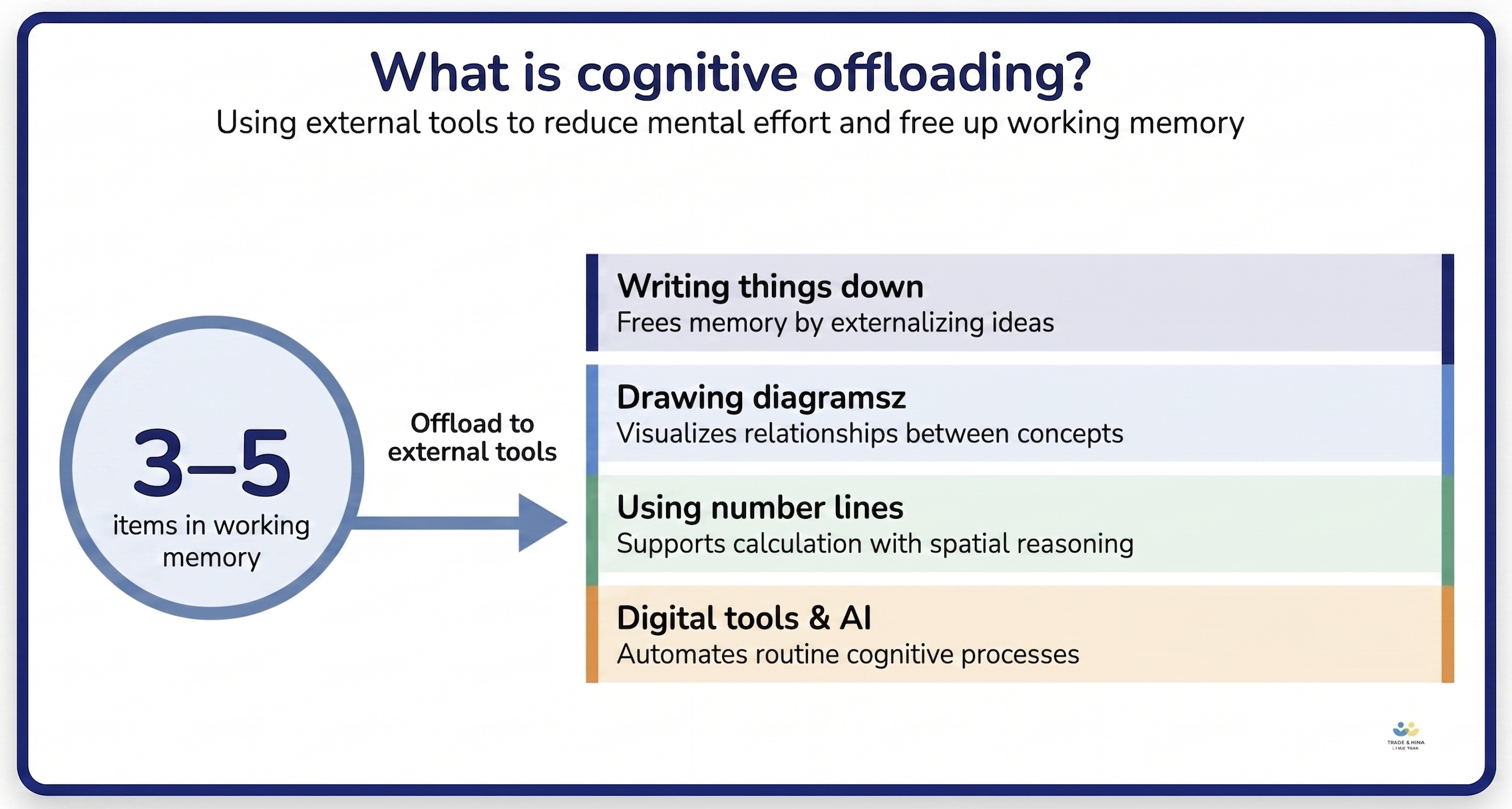
Cognitive offloading: using external resources such as notebooks, calculators or AI to reduce the mental effort a task demands.
Cognitive psychologist Paul A. Kirschner reminds us that cognitive offloading itself is not the problem. Writing down intermediate steps in a math problem reduces cognitive load and lets students continue thinking effectively. The issue is what happens when AI systems replace thinking altogether.
The difference between using AI for cognitive offloading and cognitive outsourcing a task
Traditional cognitive offloading supports human thinking and learning. Modern AI-powered tools go one step further, taking over the human thought process. They generate answers, explanations, problem-solve and produce extended responses with minimal human input.
When offloading relies too heavily on external systems, it becomes cognitive outsourcing. Kirschner defines it as “the deliberate transfer of a function that would normally be performed internally to an external agent that performs it instead.”
- Cognitive offloading: the AI tool assists the student in performing the cognitive tasks
- Cognitive outsourcing: the AI system performs the cognitive tasks
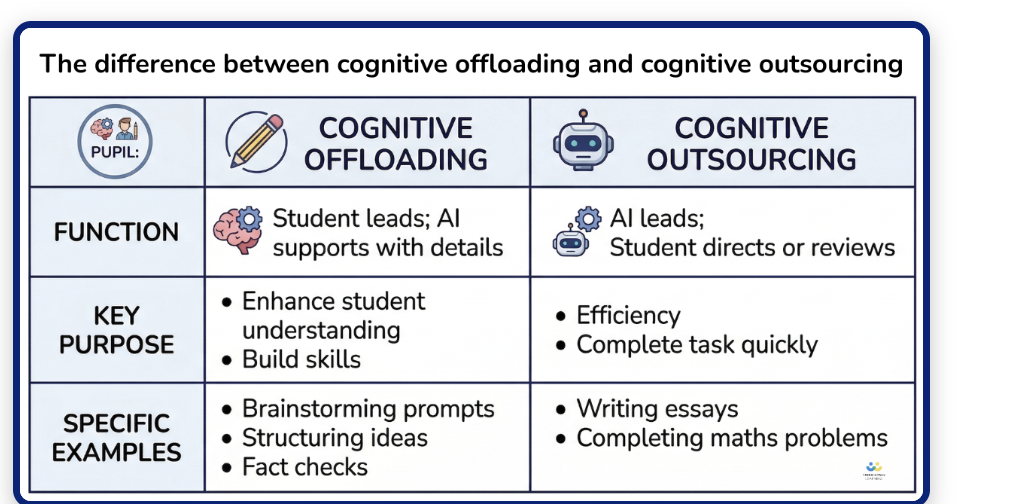
Cognitive offloading supports thinking. Cognitive outsourcing replaces it.
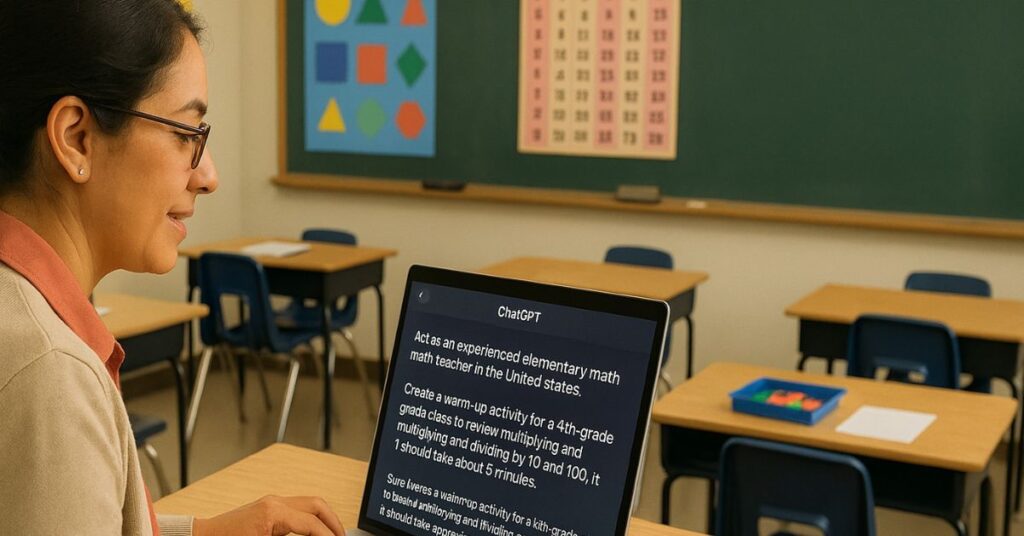
The rising use of generative AI chatbots, such as ChatGPT for math, is pushing more students from offloading into outsourcing. They no longer engage in the mental work of structuring ideas, recalling knowledge or solving a problem. Students simply prompt and receive the solution. In doing so, they outsource the thinking processes that drive learning. And when those processes are removed, the long-term benefits – stronger memory, deeper understanding, improved critical thinking and independent thought – are reduced along with them.
Cognitive offloading or cognitive outsourcing? A simple math example
There are several ways a student might solve 38 + 29:
- Calculate it mentally
- Write down their work
- Follow a structured written method
- Use a calculator
- Ask an AI system
Which of these involves cognitive offloading? Which involves outsourcing?
Method 1
The first method involves neither. The student does all the mental work, holding everything in their working memory.
Method 2 and 3
The second and third methods involve cognitive offloading. By using external aids (such as pencil and paper, or a whiteboard) and writing down intermediate results, the student reduces the strain on working memory while continuing to engage in the thinking processes required for solving problems.
Method 4 and 5
The fourth and fifth methods move toward outsourcing. Calculator use may still involve some thinking, depending on how it is used, and can function as a form of cognitive offloading when it supports rather than replaces the underlying process.
But asking AI systems for the answer removes the need for analysis, thinking, and sustained effort. At which point, the student is no longer learning how to solve the problem, they are simply asking for the answer.
Healthy cognitive offloading in the classroom
In school, students offload cognition every day, usually with teacher encouragement:
- Writing work on paper or a whiteboard
- Drawing a bar model, number line or array
- Using a multiplication chart during fluency practice
- Recording steps in a long division calculation
- Using manipulatives such as base 10 blocks, place value disks or counters
- Annotating a word problem to identify what is being asked
These are familiar forms of scaffolding, and they carry the aspects of a task that working memory cannot hold on its own. They reduce strain on working memory while keeping students engaged in the thinking processes that lead to learning. Used well, healthy cognitive offloading also supports cognitive flexibility – students learn to apply the same thinking in different contexts. The issue is not whether students use external resources to support thinking – they always have, and they always should. The issue is when AI-powered tools step in and do the thinking for them.
What the research says about AI use and student thinking
The evidence on memory and knowledge retention
A growing body of research points to the same conclusion: when AI tools reduce the mental effort involved in learning, students retain less. Cognitive effort is not a barrier to learning; it is the mechanism through which learning happens. Research suggests the pattern holds across age groups, though much of this work is recent, still moving through peer review, and not yet pooled into a large meta analysis.
An independent randomized controlled trial by Barcaui (2025) found that students using AI chatbots scored 57.5% on a retention test 45 days later, compared to 68.5% for those who did not. The difference is statistically significant and directly linked to reduced cognitive effort. A comparison over 45 days cannot account for every variable, but the direction of travel matches the wider evidence.
Bjork and Bjork’s research on “desirable difficulties” reinforces the principle: learning is most effective when it requires effort. A separate 2025 study by Gerlich at SBS Swiss Business School, involving 666 participants, found that increasing reliance on AI tools correlated with reduced critical thinking. Dan Willingham captures it more simply: “we remember what we think about.” This is the foundation of Cognitive Load Theory – we learn by effortfully processing information in working memory before storing it long term. In a short term memory task, our brains hold very little at once, which is why offloading helps and why it is so easy to overuse.
Research published in Frontiers in Psychology shows that cognitive offloading through digital tools is positively associated with self-efficacy, motivation, task persistence and learning depth – but only when learners remain actively engaged in the underlying thinking.
The negative impact is clear: more frequent use of AI systems leads to increased cognitive outsourcing, which in turn reduces active participation in key cognitive processes and contributes to a decline in cognitive autonomy. Findings suggest that when artificial intelligence reduces mental effort, actual learning and remembering is reduced. Other studies reinforce the pattern across different learning environments, though the reality in most classrooms sits somewhere between the two extremes.
Which students are most vulnerable to cognitive outsourcing
Some students face greater risk than others when AI systems enter learning. Younger children, lower-attaining learners and disadvantaged students all face heightened exposure to the long-term effects of cognitive outsourcing.
In elementary education,children are building foundational knowledge through repetition, practice and sustained cognitive engagement. Number fluency, fraction understanding and math facts all depend on repeated mental work. If AI reduces that effort, the impact is cumulative – weak foundations lead to later difficulties in problem solving and critical thinking.
Lower-attaining students are also more susceptible. Research shows less experienced and lower-ability learners are most affected by AI-driven cognitive offloading. Where stronger students may use AI to check their thinking, lower-attaining students are more likely to use the same tool to bypass thinking altogether.
The University of Technology Sydney’s 2026 report, Artificial intelligence, cognitive offloading and implications for education, captures the equity risk in stark terms:
“Students who already possess high levels of domain knowledge and strong metacognitive skills will be able to leverage AI for beneficial offloading and accelerate their learning, while students without these skills, often those already experiencing disadvantage, will be susceptible to detrimental offloading and bypassing the very learning they need.”
– Lodge and Loble, UTS, 2026
Education researcher Umberto León Domínguez adds that “intellectual capabilities essential for success in modern life need to be stimulated from an early age, especially during adolescence.” In high-school, the principle holds: success depends on independent thinking, multi-step problem solving and applying knowledge in unfamiliar contexts. State assessments and standardized tests assess whether students can think and remember – not whether they can prompt an AI system.
When AI can support learning
The evidence is not one-sided. The Brookings report “A New Direction For Students In An AI World” identifies two potential outcomes: AI can enrich or diminish learning.
When used well, AI can provide adaptive assistance, responding to individual differences in students’ knowledge, pace and understanding. They can offer immediate feedback, helping students identify errors and refine their problem-solving strategies and decision making in real time. Those insights also give teachers something concrete to act on. AI systems can increase student engagement by making abstract ideas more accessible, breaking down complex cognitive tasks, and helping students who might otherwise struggle to participate fully by encouraging effective cognitive offloading. This is one of the more promising educational practices emerging from current research.
But Brookings concludes that at present, the risks outweigh the benefits, particularly for students’ cognitive development. Artificial intelligence can aid learning when it is designed to enhance active cognitive engagement – when it prompts students to think, to reflect, to engage in solving problems, and to process knowledge actively. But when students become overly reliant on AI, it replaces those thinking processes rather than supporting them.
What protecting student thinking looks like in a tool
As schools decide how AI should be used in teaching and learning, educators need practical ways to assess whether these tools are strengthening students’ thinking or doing too much of the thinking for them. Federal guidance does not yet set product-level expectations on this, so the judgment sits with districts and schools at the point of purchase.
The concern that AI in education replaces thinking is not speculative, and it is starting to shape how the field talks about tool design. TeachAI, the schools guidance coalition led by Code.org, ETS, ISTE and Khan Academy, sets out the principle in its 2025 toolkit. Turning that principle into something you can actually check during a demo is where most evaluations fall down.
The principle itself is unambiguous:
“AI systems should serve in a consultative and supportive role without replacing the responsibilities of students, teachers, or administrators.”
– TeachAI, AI Guidance for Schools Toolkit, 2025
Three design expectations follow from it, and each one is something you can watch for in a demo.
1. AI tools should not give the answer by default
A tool that hands over the finished answer has removed the thinking the task was designed to produce. Bjork and Bjork’s work on desirable difficulties explains why that is a bad trade: the effort is not friction in the way of learning, it is what creates it.
The alternative is progressive disclosure:
responses that start with a hint or a partial step, then gradually offer more detail as the student needs it.
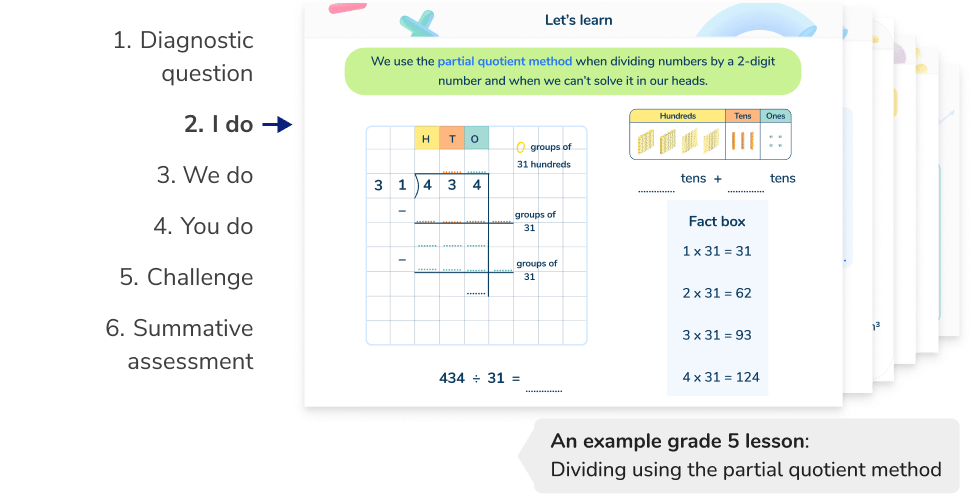
It is the “I do, we do, you do” model built into software. For schools, the first question to ask of any AI tool is simple: what does this tool do when a student asks for help? A tool that defaults to a hint keeps the student in the work. A tool that defaults to the full answer takes them out of it.
2. Students must attempt before they see a solution
A well-designed tool prompts learners for input before it provides answers or explanations, and shows a full solution only after a genuine attempt.
In the classroom, this looks like a student typing or speaking their first thought before the AI responds. If a student can press a button and skip the thinking, the tool is not doing its job. When evaluating a tool, watch a real student session: can they reach an answer without committing to the thinking first?
3. AI tools should track cognitive offloading
This is the expectation most school leaders have not yet considered, and the one almost no product volunteers. A tool that takes student thinking seriously should track and report when learners offload thinking to the system, detecting offloading behaviors like clicking to reveal a solution, pasting text into an answer box instead of writing it, accepting an auto-complete that fills most of the answer, or using “complete this for me” options.
Better still is a product that reports back to teachers on how often students asked for help of that kind, and how much of the thinking the tool ended up doing for them.
This changes what a good procurement conversation looks like. You should be able to ask any AI vendor: what counts as cognitive offloading in your product, and can you show us the data? Vendors who cannot are worth a second look before you commit.
How to evaluate AI tools: 5 questions to ask any vendor
The distinction between cognitive offloading and cognitive outsourcing is so clear that it produces a single, useful litmus test for any AI tool:
Does the tool step in and think, or does it keep the student thinking?
The five questions below build on that test. Each one turns a design expectation into something you can ask out loud, giving you a practical framework for procurement discussions, annual evaluations, and school board meetings.
1. Does the tool provide the answer directly, or guide the student through the process?
We remember what we think about, so a tool that opens with the finished answer has already removed the part that produces learning. Tools that default to answers fail this test. Tools that default to hints, partial steps and prompts pass it.
2. Does the tool require the student to attempt first?
A student should have to commit to a first thought before the system responds, and should see a full solution only after a genuine attempt. If a student can press a button and skip the thinking, the tool fails this test.
3. Does the tool use staged scaffolding before modeling the solution?
Progressive disclosure means starting with hints or partial steps, then gradually providing more detail. Ask the vendor to walk you through what happens when a student gets a question wrong. A system that goes straight to a worked example fails this test. One that offers a hint, waits for a second attempt, then offers more support, passes it.
4. Does the tool track when students offload thinking?
This is the question almost no vendor expects. A product that is serious about protecting thinking will track when learners offload thinking to the system, detecting actions like clicking to reveal a solution, pasting text instead of writing, or using “complete this for me” options. Ask any vendor: what counts as offloading in your product, and can you show us the data?
5. Can the vendor evidence how their product addresses cognitive deskilling risk?
Cognitive deskilling is the risk that a tool gradually erodes the abilities it was bought to build. A credible vendor should be able to explain their design decisions, share monitoring data, and point to evidence that their product builds critical thinking skills and active cognitive engagement rather than serving up ready-made solutions. If they cannot, take a second look before committing.
These five questions form a usable evaluation framework for any AI tool used with students. They turn what the research says about effort and memory into specific procurement conversations – and they help you choose tools that scaffold thinking rather than replace it.
What scaffolded AI learning looks like in practice
AI systems that support learning follow a recognizable pattern. Consider a typical high school algebra problem: Solve 2(x + 3) = 14.
A scaffolded AI system would:
- Pose the question
- Require the student to attempt an answer
- If incorrect, prompt: “What is the first step when expanding parentheses?”
- Require a second attempt
- Provide further guidance if necessary
- Only then, present the full solution model.
At each stage, the student is actively thinking, and the AI tool supports this process without replacing the child’s effort. The approach mirrors the familiar “I do, we do, you do” teaching pattern – demonstrate understanding, practice with guidance, then try independently. Effective AI learning tools mirror this structure, fostering cognitive engagement rather than just speed.
Case study: progressive disclosure in practice with Skye
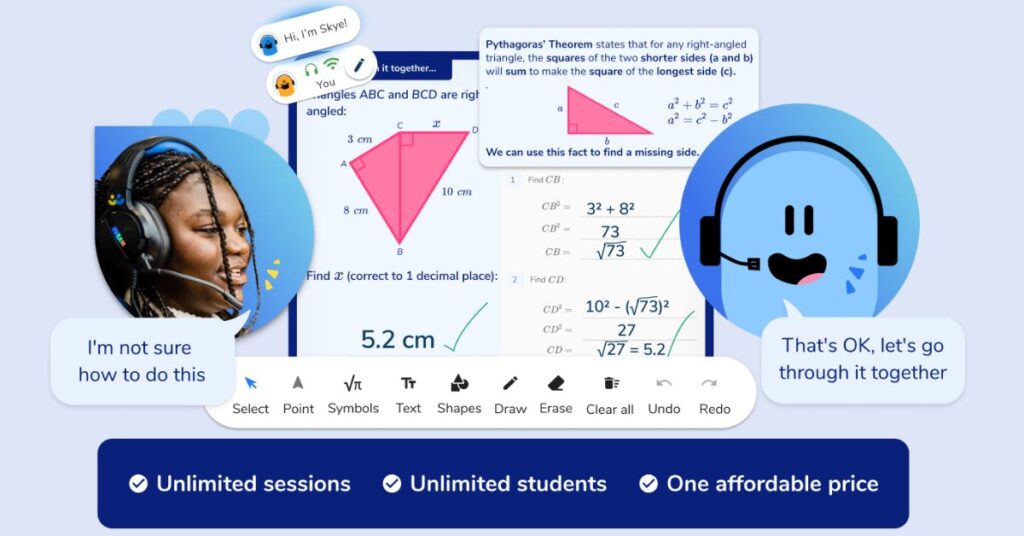
Third Space Learning’s AI math tutor, Skye, is built around the same model described above.
Skye delivers spoken, scaffolded lessons aligned to state standards and Common Core for elementary, middle and high school students. Its design draws on more than 2.1 million hours of one-on-one tutoring delivered to over 196,000 students across 4,200+ schools since 2013. The teaching content is created by qualified teachers and math specialists – not generated by the AI itself – which means every lesson follows sound pedagogical principles and curriculum-aligned scaffolding.
Progressive disclosure is built in. When a student answers incorrectly, the system does not provide the full solution. It provides a targeted hint based on the specific error and prompts the student to attempt again. Only after 3 repeated incorrect attempts does it model the correct approach.
In an independent evaluation with Educate Ventures Research, a UK-based education research organization, 92% of students successfully completed the end-of-session assessment (Skill Check Out), compared to 34% who passed the equivalent diagnostic at the start of the same session (Skill Check In). 64% of students reported increased confidence by the end. Sessions are recorded for student safety and quality assurance.
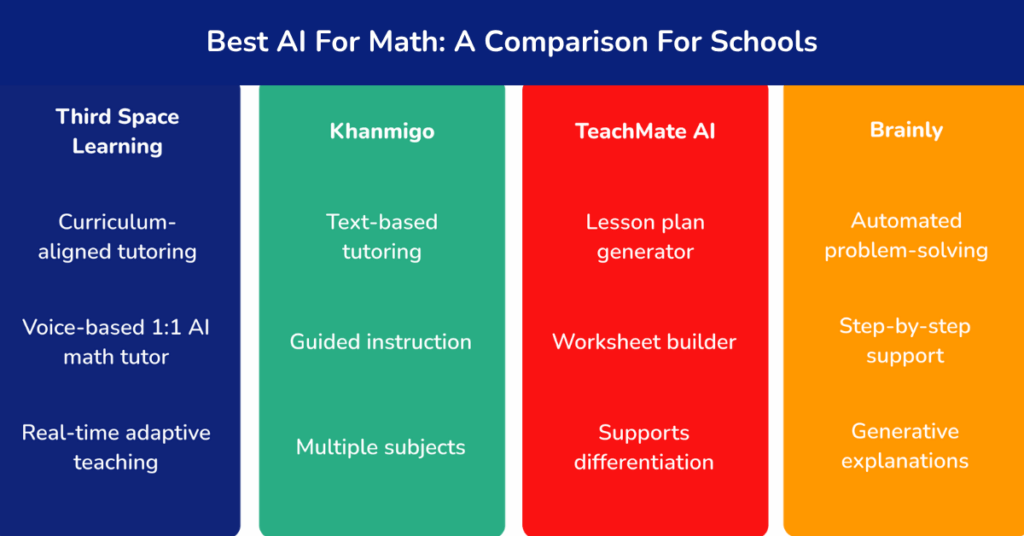
The contrast with general-purpose AI chatbots (such as ChatGPT, Gemini or Copilot) is straightforward. These technology systems are built on large language models trained on vast amounts of data, designed to perform tasks quickly and serve up ready-made solutions. A purpose-built AI tutoring tool has a different goal: to build knowledge, develop critical thinking skills, and improve independent problem solving and decision making. With purpose-built tutoring, the student remains active throughout – the system structures the thinking, builds capacity for analysis, and requires sustained reflective thought. Good practice now expects the latter, not the former.
Practical strategies for keeping students cognitively active alongside AI
If schools are using AI systems, the goal is not to remove them but to structure their use so that thinking remains central across learning environments. School leaders and teachers can focus on three things: careful task design, talking to students about AI use, and reviewing how AI is used in school. Classroom relationships do a lot of the work here: a student will explain their reasoning to a person they trust long before they will explain it to a chatbot.
What to do tomorrow
Three quick ways to keep students cognitively active in your next lesson:
- Ask them to explain their working aloud or in writing before they reach for a tool. If they can explain it, they’re thinking.
- Build in a “show your strategy” step before any answer is checked, by AI or otherwise. The strategy is what’s being assessed, not the answer.
- Choose one piece of work this week where AI is off-limits, and frame it as a thinking task rather than a finishing task.
1. Design tasks that require learners to think, not just prompt
Tasks should:
- Resist outsourcing: Problems requiring diagrams, prior working or peer discussion are harder for AI to complete and keep students thinking.
- Require explanations: If a student has used AI to get an answer, they will struggle to explain how it was derived. Tasks centered on explanation don’t benefit from AI shortcuts.
- Be process-focused: Students want to find an answer; tasks and feedback should center on how they get to one. Show your working, and feedback should focus on that working.
- Include variability and transfer: Tasks should require learners to apply knowledge in unfamiliar contexts, not repeat the same structure. This makes AI shortcuts harder.
2. Talk to students about AI dependence
Heavy reliance on AI is not primarily a behavior issue; it is a metacognitive one. People tend to underestimate how much effortful thinking is required to develop cognitive abilities and retain knowledge, and most of us carry beliefs about learning that do not survive contact with the evidence. Students need to learn how their own memory works: that effortful, sometimes uncomfortable thinking is what makes learning stick.
There is a broader literacy point too. AI systems, like the social media platforms before them, can create echo chambers – students encounter only the ideas the system surfaces for them. Confirmation bias becomes more likely when an AI agrees with whatever the student first proposes. Open conversations about how AI tools shape thinking are an important part of building cognitive autonomy.
Using AI to get the answer is like watching someone else train at the gym. You see the movements. You know what is happening. But you do not build your own strength.
Goal setting helps: when students set their own target for a piece of work, they notice more quickly when a tool has done that work for them. Schools that build this understanding into everyday class practice are better placed to develop independent learners. For high school students, the link to exams is direct: on state assessments and standardized tests, there is no AI to help. Students must rely on their own thinking, their own knowledge and their own ability to problem-solve.
3. Reviewing AI use in your school: what to look for
For school leaders, the key question is simple: What are students doing when they use AI tools?
Practical signals to look for:
- Are they using them to generate answers, or to check their own work?
- Can they explain the reasoning behind AI-supported responses?
- Are they engaging in sustained thinking, or moving quickly between tasks with minimal mental effort?
- Does the school’s approach distinguish between different types of AI systems?
For AI tutoring specifically:
- Does the tool report on where learners need support within the process of solving problems?
- Can teachers see the sequence of hints, attempts, and corrections and how the pathway has been scaffolded?
- Does the system prioritize cognitive engagement or completion?
These are not technical metrics. They are indicators of learning. Schools should make AI review a standing item in department meetings or curriculum discussions.
What is cognitive atrophy and why does it matter for schools?
Cognitive atrophy is the gradual weakening of the cognitive skills that students need to think, remember and reason independently. It is what happens when cognitive offloading tips into cognitive outsourcing, repeatedly, over a sustained period.
The term has moved from research papers into mainstream education conversation over the past year. In March 2026, the University of Technology Sydney published Artificial intelligence, cognitive offloading and implications for education, a major report by Professor Jason Lodge (a cognitive psychologist at the University of Queensland) and Professor Leslie Loble (UTS). Their conclusion is direct:
“While unstructured use of AI risks cognitive atrophy, humans still learn more effectively from and with other humans.” – Professor Jason Lodge
The risk, the report argues, is sharpest for school-age students:
“School years are critical for building the memory stores and cognitive foundations that last a lifetime. If we allow AI to replace that process for some students, we risk creating a learning divide that will be very hard to close.” – Professor Jason Lodge
A May 2026 article in Psychology Today, Your Brain on AI: Cognitive Offloading, Debt, and Atrophy, describes AI chatbots as a “cognitive crutch” that “provides immediate support, but weakens rather than strengthens learning.” The author, Dr. Joe Pierre, captures why schools should pay particular attention: “You can’t cognitively offload if you never onloaded in the first place.”
That is the schools-specific stakes argument. Adults using AI offload tasks they already know how to do. Students, building foundational knowledge for the first time, are at risk of never learning to do the work at all. Tools designed around progressive disclosure, with built-in reporting on offloading behavior, are the practical answer to it.
Engaging in cognitive processes
The question facing schools is not whether to use artificial intelligence but how to strike the right balance – ensuring learners are still engaging in the necessary thinking processes when they do. If AI-driven digital tools reduce mental effort, they reduce learning. But if they are designed and used to support problem- solving, sustain thinking and strengthen cognitive processes, they can play a valuable role in the future of education.
The next step is a practical one: take one AI tool currently used in your school. Apply the questions in this framework and ask, honestly: is this tool supporting learning or replacing it?
Cognitive offloading FAQs
Cognitive offloading is the use of external resources – notebooks, calculators or AI – to reduce the mental effort a task demands. In schools, it is a form of healthy scaffolding when it supports student thinking, such as writing down the working or using a number line. It becomes a concern when AI tools are used to replace the thinking process entirely, which is known as cognitive outsourcing.
Cognitive atrophy is the gradual decline of cognitive skills like critical thinking, memory and reasoning that develops when students consistently outsource their thinking to AI systems. The term is used in current research, including the University of Technology Sydney’s 2026 report, Artificial intelligence, cognitive offloading and implications for education. The risk is sharpest for school-age students, who are still building foundational knowledge.
The clearest signal is a student who has an answer but cannot explain how they reached it. Ask students to talk through their strategy before any answer is checked, watch whether they move quickly between tasks with little apparent effort, and look at whether AI is being used to check their own work or to produce it. Tasks built around explanation, prior working and unfamiliar contexts make outsourcing much harder to hide.
Schools should evaluate any AI tool against how it treats student thinking. Key questions to ask include: does the tool default to giving the answer or providing a hint? Does it require student input before providing a solution? Does it track and report on cognitive offloading behaviors? A tool that keeps students doing the thinking supports learning; one that does the thinking for them may undermine it.
Cognitive offloading is when an external tool assists a student in performing cognitive tasks – for example, using a calculator to check a written method. Cognitive outsourcing is when the tool performs the cognitive tasks instead of the student. Good product design aims to prevent AI tools from defaulting to outsourcing, by requiring progressive disclosure and student input.
Do you have students who need extra support in math?
Skye – our AI math tutor built by experienced teachers – provides students with personalized one-on-one, spoken instruction that helps them master concepts, close skill gaps, and gain confidence.
Since 2013, we’ve delivered 2,295,000 math tutoring sessions to 196,000 students, guiding them toward higher math achievement.
Discover how our AI math tutoring can boost student success, or see how our math programs can support your school’s goals:
– 3rd grade tutoring
– 4th grade tutoring
– 5th grade tutoring
– 6th grade tutoring
– 7th grade tutoring
– 8th grade tutoring